Creating custom MDP problems in MDPax

This tutorial shows how to implement your own Markov Decision Process (MDP) problems using MDPax. We’ll implement the classic FrozenLake environment, which is a well-known example from OpenAI’s Gym/Gymnasium.
If you’re running the notebook in Google Colab, you should verify that you’re using a GPU instance. Click Runtime > Change runtime type and ensure “GPU” is selected as the Hardware accelerator. You can confirm GPU availability by running !nvidia-smi in a code cell.
Prerequisites
Before getting started, you might find these resources helpful if you’re unfamiliar with either JAX or MDPs.
JAX Background
MDP Background
MDPax Problem class
The Problem class is used to represent MDPs in MDPax. As described in the [Getting Started] notebook, it uses a functional approach to describe the MDP instead of explicitly creating transition and reward matrices.
When creating a subclass of Problem to represent your own MDP, you will need to define an __init__ method and the following methods marked as @abstractmethods in the Problem class:
name: A unique string identifier for the MDP_construct_state_space: A helper function that builds an array of all possible states, with dimensions [n_states, state_dim]state_to_index: A function that maps from a state vector to its index in the state space array_construct_action_space: A helper function that builds an array of all possible actions, with dimensions [n_actions, action_dim]_construct_random_event_space: A helper function that builds an array of all possible random events, with dimensions [n_events, event_dim]random_event_probability: A function that returns the probability of a random event given a state and actiontransition: A function that returns the next state and reward given a state, action, and random event.
See the MDPax documentation for detailed information about the Problem class.
In this notebook we’ll walk through implementing each of those methods for the FrozenLake problem.
Installation and imports
If you’re running the notebook in Google Colab you may need to restart the runtime after installing the dependencies so that the updated packages can be loaded. You will receive a “Warning” message in the output of the cell below if this is the case.
[1]:
import sys

try:
    import mdptoolbox
    import mdpax
    import matplotlib
except ImportError:
    if 'google.colab' in sys.modules:
        # Automatically install mdpax if running in Colab, environment is temporary
        !pip install "mdpax[examples-colab] @ git+https://github.com/joefarrington/mdpax.git"
    else:
        print("Dependencies not installed. Please follow the installation instructions in the README: https://github.com/joefarrington/mdpax")
[2]:
import jax
import jax.numpy as jnp
import matplotlib.pyplot as plt
import mdptoolbox
import numpy as np

from mdpax.core.problem import Problem
from mdpax.utils.spaces import create_range_space
from mdpax.utils.types import (
    ActionSpace,
    ActionVector,
    Policy,
    RandomEventSpace,
    RandomEventVector,
    Reward,
    StateSpace,
    StateVector,
)
FrozenLake
In FrozenLake, an agent must navigate from start (S) to goal (G) on a frozen lake surface (F), avoiding holes in the ice (H).
The default 4x4 map looks like this:
SFFF
FHFH
FFFH
HFFG
The surface can be slippery, making movement stochastic: when the agent chooses a direction, they may instead slide perpendicular to their intended direction.
1 Step-by-step Problem definition
First, we’ll create our FrozenLake class that inherits from mdpax.core.problem.Problem. The base class handles much of the boilerplate, we just need to implement the required methods.
In order to avoid duplication in the notebook, each part of the step-by-step definition inherits from the previous one, building up the class definition. All the cells in Part 1 therefore need to be run in order. To see the full class definition rather than working through the methods one by one you can skip ahead to Part 2.
1.1 The __init__ method and config class
We’ll start with an outline of the class, with a placeholder for each method, and fill in the __init__ method. We use some custom types in the function signature, which are defined in mdpax/utils/types.py.
Following the gym implementation, we need to support three arguments:
desc: A custom mapmap_name: A key for a map in the dictionary of known mapsMAPSis_slippery: Whether the lake is slippery or not
We’ll comment out super().__init__() for now because it performs some setup procedures that rely on all the methods being defined and we are implementing them one by one.
[3]:
# Dictionary of known maps
# From https://github.com/openai/gym/blob/master/gym/envs/toy_text/frozen_lake.py
MAPS = {
    "4x4": ["SFFF", "FHFH", "FFFH", "HFFG"],
    "8x8": [
        "SFFFFFFF",
        "FFFFFFFF",
        "FFFHFFFF",
        "FFFFFHFF",
        "FFFHFFFF",
        "FHHFFFHF",
        "FHFFHFHF",
        "FFFHFFFG",
    ],
}
[4]:
class FrozenLake(Problem):
    """FrozenLake MDP from OpenAI Gym.

    Models navigation on a grid world with slippery movement.

    The agent must navigate from start (S) to goal (G) on a frozen lake surface (F)
    where the surface is slippery and there are holes (H) that end the episode.

    Example 4x4 map:
    SFFF
    FHFH
    FFFH
    HFFG

    State Space (state_dim = 2):
        Vector containing:
        - Row: 1 element in range [0, n_rows-1]
        - Column: 1 element in range [0, n_cols-1]

    Action Space (action_dim = 1):
        Vector containing:
        - Intended movement direction: 1 element in range [0, 3]
            where:
            - 0: LEFT
            - 1: DOWN
            - 2: RIGHT
            - 3: UP

    Random Events (event_dim = 1):
        Vector containing:
        - Actual movement direction: 1 element in range [0, 3]

    Dynamics:
        1. The agent chooses an intended movement direction
        2. The agent moves in the actual direction.
            - If the surface is not slippery, the agent moves in the intended direction.
            - If the surface is slippery, the agent has a 1/3 probability of moving
                in the intended direction, a 1/3 probability of moving in the
                direction to the left of the intended direction, and a 1/3
                probability of moving in the direction to the right of the intended
                direction.
        3. The episode ends when the agent reaches the goal or falls into a hole

    Args:
        desc: Custom map layout as list of strings
        map_name: Key for a map in the dictionary of known maps `MAPS`
        is_slippery: If True, the movement direction is stochastic
    """
    def __init__(
        self,
        desc: list[str] | None = None,
        map_name: str = "4x4",
        is_slippery: bool = True,
    ):
        self.desc = desc
        self.map_name = map_name
        self.is_slippery = is_slippery

        # Use a custom map if provided
        if desc is not None:
            self.map = desc
        else:
            self.map = MAPS[map_name]

        # Convert map to array for efficient lookup
        # Needs to be numeric so use 1 for hole and 2 for goal
        # 0 for frozen surface
        self.grid = jnp.array([
            [1 if c == 'H' else 2 if c == 'G' else 0
             for c in row]
            for row in self.map
        ])
        self.n_rows, self.n_cols = self.grid.shape

        # This relies on all the methods being defined, so
        # comment out until class complete
        #super().__init__()

    @property
    def name(self) -> str:
        """Unique identifier for this problem type."""
        pass

    def _construct_state_space(self) -> StateSpace:
        """Build array of all possible states.

        Returns:
            Array of shape [n_states, state_dim] containing all possible states
        """
        pass

    def state_to_index(self, state: StateVector) -> int:
        """Convert state vector to index.

        Args:
            state: Vector representation of a state [state_dim]

        Returns:
            Index of the state in state_space

        Note:
            This mapping must be consistent with the ordering in state_space
        """
        pass

    def _construct_action_space(self) -> ActionSpace:
        """Build an array of all possible actions.

        Returns:
            Array of shape [n_actions, action_dim] containing all possible actions
        """
        pass

    def _construct_random_event_space(self) -> RandomEventSpace:
        """Build an array of all possible random events.

        Returns:
            Array of shape [n_events, event_dim] containing all possible random events
        """
        pass

    def random_event_probability(
        self,
        state: StateVector,
        action: ActionVector,
        random_event: RandomEventVector
    ) -> float:
        """Calculate probability of random event given state-action pair.

        Args:
            state: Current state vector [state_dim]
            action: Action vector [action_dim]
            random_event: Random event vector [event_dim]

        Returns:
            Probability of the random event occurring
        """
        pass

    def transition(
    self,
    state: StateVector,
    action: ActionVector,
    random_event: RandomEventVector
    ) -> tuple[StateVector, Reward]:
        """Compute next state and reward for a transition.

        Args:
            state: Current state vector [state_dim]
            action: Action vector [action_dim]
            random_event: Random event vector [event_dim]

        Returns:
            Tuple containing the next state vector [state_dim] and
            the immediate reward
        """
        pass
Now we can create an instance using the 4x4 map with slippery movement:
[5]:
problem = FrozenLake(map_name="4x4", is_slippery=True)
[6]:
problem.grid
[6]:
Array([[0, 0, 0, 0],
       [0, 1, 0, 1],
       [0, 0, 0, 1],
       [1, 0, 0, 2]], dtype=int32)
1.2 The name property
The name property is used to set a checkpoint directory when one is not provided. It can therefore be a name for any problem represented by the class or, as here, provide some information about the input settings.
[7]:
class FrozenLake(FrozenLake):
    @property
    def name(self) -> str:
        """Unique identifier for this problem type."""
        s = "slippery" if self.is_slippery else "non_slippery"
        if self.desc is not None:
            return f"frozen_lake_custom_{s}"
        else:
            return f"frozen_lake_{self.map_name}_{s}"
[8]:
problem = FrozenLake(map_name="4x4", is_slippery=True)
problem.name
[8]:
'frozen_lake_4x4_slippery'
1.3 The _construct_state_space and state_to_index methods
In MDPax, the state_space for a problem is a 2D array that contains every possible state for the MDP. Each row is a vector representing one state. This helper method is called when the class is instantiated, and builds the state_space array.
The state_to_index method converts a state vector to its index in the state_space. The array representing the value function uses the same ordering as the state_space and therefore this is used to, for example, find the value of the next state during value iteration. The transition function returns a state vector, the index of that state is found using state_to_index, and then the value of the next state is identified by looking up that element in the array of values.
In this problem, the state vector has two components: the row and column of the gridworld. All of the states between the bounds (0 and n_rows - 1 and 0 and n_columns - 1, for the two dimensions of our state) are valid and therefore we can use the MDPax helper function create_range_space to build the state space and a method to extract the index for a state.
[9]:
class FrozenLake(FrozenLake):
    def _construct_state_space(self) -> StateSpace:
        """Build array of all possible states.

        Returns:
            Array of shape [n_states, state_dim] containing all possible states
        """
        mins = np.zeros(2, dtype=np.int32)
        maxs = np.array([self.n_rows-1, self.n_cols-1], dtype=np.int32)
        state_space, self._state_to_index_fn = create_range_space(mins, maxs)
        return state_space


    def state_to_index(self, state: StateVector) -> int:
        """Convert state vector to index."""
        return self._state_to_index_fn(state)
[10]:
problem = FrozenLake(map_name="4x4", is_slippery=True)
problem._construct_state_space() # 16 states for the (4x4) grid
[10]:
Array([[0, 0],
       [0, 1],
       [0, 2],
       [0, 3],
       [1, 0],
       [1, 1],
       [1, 2],
       [1, 3],
       [2, 0],
       [2, 1],
       [2, 2],
       [2, 3],
       [3, 0],
       [3, 1],
       [3, 2],
       [3, 3]], dtype=int32)
[11]:
problem.state_to_index(jnp.array([0, 0]))
[11]:
Array(0, dtype=int32)
[12]:
problem.state_to_index(jnp.array([1, 3]))
[12]:
Array(7, dtype=int32)
[13]:
problem.state_to_index(jnp.array([3, 3]))
[13]:
Array(15, dtype=int32)
1.4 The _construct_action_space method
The action_space is a 2D array containing every possible action. Each row is a vector representing one action. This helper method is called when the class is instantiated, and builds the action_space array.
In this problem, the action vector has one component: an integer representing the intended direction of movement. We reshape the array to [n_actions, 1] so that we have a 2D array which is expected by MDPax for all problems.
[14]:
class FrozenLake(FrozenLake):
    def _construct_action_space(self) -> ActionSpace:
        """Build an array of all possible actions.

        Returns:
            Array of shape [n_actions, action_dim] containing all possible actions
        """
        # One action for each direction
        return jnp.arange(4).reshape(-1, 1)
Problem characteristics do not change the action space
[15]:
problem = FrozenLake(map_name="4x4", is_slippery=True)
problem._construct_action_space()
[15]:
Array([[0],
       [1],
       [2],
       [3]], dtype=int32)
[16]:
problem = FrozenLake(map_name="4x4", is_slippery=False)
problem._construct_action_space()
[16]:
Array([[0],
       [1],
       [2],
       [3]], dtype=int32)
1.5 The _construct_random_event_space method
MDP transitions may be stochastic, and MDPax handles this using random_event_space, a 2D array containing every possible random event. The transition function is deterministic given a state, action and random event.
Each row is a vector representing one random event. This helper method is called when the class is instantiated, and builds the random_event_space array.
In this problem, the random event vector has one component: an integer representing the actual direction of movement. We reshape the array to [n_events, 1] so that we have a 2D array which is expected by MDPax for all problems.
[17]:
class FrozenLake(FrozenLake):
    def _construct_random_event_space(self) -> RandomEventSpace:
        """Build an array of all possible random events.

        Returns:
            Array of shape [n_events, event_dim] containing all possible random events
        """
        return jnp.arange(4).reshape(-1, 1)
Problem characteristics do not change the random event space
[18]:
problem = FrozenLake(map_name="4x4", is_slippery=True)
problem._construct_random_event_space()
[18]:
Array([[0],
       [1],
       [2],
       [3]], dtype=int32)
[19]:
problem = FrozenLake(map_name="8x8", is_slippery=True)
problem._construct_random_event_space()
[19]:
Array([[0],
       [1],
       [2],
       [3]], dtype=int32)
1.6 The random_event_probability method
This method returns the probability of a specific random event when in a state and taking an action.
When used with an MDPAX Solver class, both random_event_probability and transition will be JIT compiled and transformed by JAX’s vmap/pmap transformations to efficiently run on GPUs. This means they must be written using JAX array operations and avoid, for example, Python control flow which does not work with JIT. See the tutorials in the JAX documention for more information, specifically the sections on JIT
compilation and ‘The Sharp Bits’ for common issues.
In this case, the probability depends on whether the lake is slippery or not, so we will write two helper functions - one to use when the lake is slippery and one when it isn’t - to simplify the logic.
[20]:
class FrozenLake(FrozenLake):

    def random_event_probability(
        self,
        state: StateVector,
        action: ActionVector,
        random_event: RandomEventVector
    ) -> float:
        """Calculate probability of random event given state-action pair.

        Args:
            state: Current state vector [state_dim]
            action: Action vector [action_dim]
            random_event: Random event vector [event_dim]

        Returns:
            Probability of the random event occurring
        """
        # Instead of using Python control flow, we use JAX's lax.cond function to
        # select the correct function to call based on whether the lake is slippery or not.
        # This takes the form jnp.lax.cond(condition, true_fn, false_fn, *operands)

        return jax.lax.cond(self.is_slippery,
                         self._random_event_probability_slippery,
                         self._random_event_probability_not_slippery, state, action, random_event)


    def _random_event_probability_slippery(self, state: StateVector,
                                           action: ActionVector,
                                           random_event: RandomEventVector) -> float:
        """Calculate probability of random event given state-action pair when the lake is slippery."""
        intended_direction = action[0]
        opposite_direction = (intended_direction + 2) % 4
        # 1/3 prob of each direction except opposite intended

        # jnp.where is like numpy.where but for JAX arrays
        # creates an array of 4 elements, 1/3 for each direction except opposite intended
        probs = jnp.where(jnp.arange(4) == opposite_direction, 0, 1/3)
        return probs[random_event[0]]

    def _random_event_probability_not_slippery(self, state: StateVector,
                                               action: ActionVector,
                                               random_event: RandomEventVector) -> float:
        """Calculate probability of random event given state-action pair when the lake is not slippery."""
        # Probability of intended direction is 1.0
        return jnp.where(action[0] == random_event[0], 1.0, 0.0)
Try when the lake is slippery
[21]:
problem = FrozenLake(map_name="4x4", is_slippery=True)
print(f"Try to go left, get left: {problem.random_event_probability(state=jnp.array([0, 0]), action=jnp.array([0]), random_event=jnp.array([0])):.2f}")
print(f"Try to go left, get right: {problem.random_event_probability(state=jnp.array([0, 0]), action=jnp.array([0]), random_event=jnp.array([2])):.2f}")
print(f"Try to go left, get up: {problem.random_event_probability(state=jnp.array([0, 0]), action=jnp.array([0]), random_event=jnp.array([1])):.2f}")
print(f"Try to go left, get down: {problem.random_event_probability(state=jnp.array([0, 0]), action=jnp.array([0]), random_event=jnp.array([3])):.2f}")
Try to go left, get left: 0.33
Try to go left, get right: 0.00
Try to go left, get up: 0.33
Try to go left, get down: 0.33
And when it isn’t slippery:
[22]:
problem = FrozenLake(map_name="4x4", is_slippery=False)
print(f"Try to go left, get left: {problem.random_event_probability(state=jnp.array([0, 0]), action=jnp.array([0]), random_event=jnp.array([0])):.2f}")
print(f"Try to go left, get right: {problem.random_event_probability(state=jnp.array([0, 0]), action=jnp.array([0]), random_event=jnp.array([2])):.2f}")
print(f"Try to go left, get up: {problem.random_event_probability(state=jnp.array([0, 0]), action=jnp.array([0]), random_event=jnp.array([1])):.2f}")
print(f"Try to go left, get down: {problem.random_event_probability(state=jnp.array([0, 0]), action=jnp.array([0]), random_event=jnp.array([3])):.2f}")
Try to go left, get left: 1.00
Try to go left, get right: 0.00
Try to go left, get up: 0.00
Try to go left, get down: 0.00
1.7 The transition method
The transition method is deterministic because any random elements in a transition are specified by the random event argument. It returns the next state and the reward when we take a specified action in a specified state and stochastic elements resolve to the specified random event.
As with random_event_probability, this needs to be written using JAX array operations so that it can be transformed using JAX’s vmap and pmap transformations and JIT compiled. We therefore use jnp.where instead of Python if statements for control flow.
In this problem, we have terminal states (the goal and the holes in the ice). Once the agent reaches a terminal state it stays there forever.
[23]:
class FrozenLake(FrozenLake):
    def transition(
    self,
    state: StateVector,
    action: ActionVector,
    random_event: RandomEventVector
    ) -> tuple[StateVector, Reward]:
        """Compute next state and reward for a transition.

        Args:
            state: Current state vector [state_dim]
            action: Action vector [action_dim]
            random_event: Random event vector [event_dim]

        Returns:
            Tuple containing the next state vector [state_dim] and
            the immediate reward
        """

        row, col = state[0], state[1]
        is_terminal_state = (self.grid[row, col] == 1) | (self.grid[row, col] == 2) # Goal or hole

        # Direction we actually move defined by random event
        actual_direction = random_event[0]

        # Calculate next row - move down or up
        # If we are at top or bottom of grid, stay in current row
        next_row = jnp.where(
            actual_direction == 1,  # DOWN
            jnp.minimum(row + 1, self.n_rows - 1),
            jnp.where(
                actual_direction == 3,  # UP
                jnp.maximum(row - 1, 0),
                row  # No change for LEFT/RIGHT
            )
        )

        # Calculate next column - move left or right
        # If we are at left or right of grid, stay in current column
        next_col = jnp.where(
            actual_direction == 0,  # LEFT
            jnp.maximum(col - 1, 0),
            jnp.where(
                actual_direction == 2,  # RIGHT
                jnp.minimum(col + 1, self.n_cols - 1),
                col  # No change for UP/DOWN
            )
        )

        # Construct next state
        next_state = jnp.array([next_row, next_col])

        # Stay in current state if terminal
        next_state = jnp.where(
            is_terminal_state,
            state,
            next_state
        )

        # Calculate reward (1 only when transitioning TO goal, not for staying in goal)
        reward = jnp.where(
            is_terminal_state,
            0.0,  # No reward in terminal states
            jnp.where(self.grid[next_row, next_col] == 2, 1.0, 0.0)  # 1.0 for reaching goal
        )

        return next_state, reward
[24]:
problem = FrozenLake(map_name="4x4", is_slippery=True)
[25]:
next_state, reward = problem.transition(
    state=jnp.array([0, 0]), action=jnp.array([0]), random_event=jnp.array([0]))
print(f"Moving left from start, next state: {next_state}, reward: {reward}")
Moving left from start, next state: [0 0], reward: 0.0
[26]:
next_state, reward = problem.transition(
    state=jnp.array([3, 2]), action=jnp.array([2]), random_event=jnp.array([2]))
print(f"Moving right into goal, next state {next_state}, reward: {reward}")
Moving right into goal, next state [3 3], reward: 1.0
[27]:
next_state, reward = problem.transition(
    state=jnp.array([2, 3]), action=jnp.array([1]), random_event=jnp.array([1]))
print(f"Trying to move from a hole, next state: {next_state}, reward: {reward}")
Trying to move from a hole, next state: [2 3], reward: 0.0
[28]:
problem = FrozenLake(map_name="4x4", is_slippery=False)
2 Putting it all together
Here is the full class definition for the FrozenLake problem.
[29]:
class FrozenLake(Problem):
    """FrozenLake MDP from OpenAI Gym.

    Models navigation on a grid world with slippery movement.

    The agent must navigate from start (S) to goal (G) on a frozen lake surface (F)
    where the surface is slippery and there are holes (H) that end the episode.

    Example 4x4 map:
    SFFF
    FHFH
    FFFH
    HFFG

    State Space (state_dim = 2):
        Vector containing:
        - Row: 1 element in range [0, n_rows-1]
        - Column: 1 element in range [0, n_cols-1]

    Action Space (action_dim = 1):
        Vector containing:
        - Intended movement direction: 1 element in range [0, 3]
            where:
            - 0: LEFT
            - 1: DOWN
            - 2: RIGHT
            - 3: UP

    Random Events (event_dim = 1):
        Vector containing:
        - Actual movement direction: 1 element in range [0, 3]

    Dynamics:
        1. The agent chooses an intended movement direction
        2. The agent moves in the actual direction.
            - If the surface is not slippery, the agent moves in the intended direction.
            - If the surface is slippery, the agent has a 1/3 probability of moving
                in the intended direction, a 1/3 probability of moving in the
                direction to the left of the intended direction, and a 1/3
                probability of moving in the direction to the right of the intended
                direction.
        3. The episode ends when the agent reaches the goal or falls into a hole

    Args:
        desc: Custom map layout as list of strings
        map_name: Key for a map in the dictionary of known maps `MAPS`
        is_slippery: If True, the movement direction is stochastic
    """
    def __init__(
        self,
        desc: list[str] | None = None,
        map_name: str = "4x4",
        is_slippery: bool = True,
    ):
        self.desc = desc
        self.map_name = map_name
        self.is_slippery = is_slippery

        # Use a custom map if provided
        if desc is not None:
            self.map = desc
        else:
            self.map = MAPS[map_name]

        # Convert map to array for efficient lookup
        # Needs to be numeric so use 1 for hole and 2 for goal
        # 0 for frozen surface
        self.grid = jnp.array([
            [1 if c == 'H' else 2 if c == 'G' else 0
             for c in row]
            for row in self.map
        ])
        self.n_rows, self.n_cols = self.grid.shape

        super().__init__()

    @property
    def name(self) -> str:
        """A unique identifier for this problem type"""
        s = "slippery" if self.is_slippery else "non_slippery"
        if self.desc is not None:
            return f"frozen_lake_custom_{s}"
        else:
            return f"frozen_lake_{self.map_name}_{s}"

    def _construct_state_space(self) -> StateSpace:
        """Build array of all possible states.

        Returns:
            Array of shape [n_states, state_dim] containing all possible states
        """
        mins = np.zeros(2, dtype=np.int32)
        maxs = np.array([self.n_rows-1, self.n_cols-1], dtype=np.int32)
        state_space, self._state_to_index_fn = create_range_space(mins, maxs)
        return state_space


    def state_to_index(self, state: StateVector) -> int:
        """Convert state vector to index."""
        return self._state_to_index_fn(state)

    def _construct_action_space(self) -> ActionSpace:
        """Build an array of all possible actions.

        Returns:
            Array of shape [n_actions, action_dim] containing all possible actions
        """
        # One action for each direction
        return jnp.arange(4).reshape(-1, 1)

    def _construct_random_event_space(self) -> RandomEventSpace:
        """Build an array of all possible random events.

        Returns:
            Array of shape [n_events, event_dim] containing all possible random events
        """
        return jnp.arange(4).reshape(-1, 1)

    def random_event_probability(
        self,
        state: StateVector,
        action: ActionVector,
        random_event: RandomEventVector
    ) -> float:
        """Calculate probability of random event given state-action pair.

        Args:
            state: Current state vector [state_dim]
            action: Action vector [action_dim]
            random_event: Random event vector [event_dim]

        Returns:
            Probability of the random event occurring
        """
        # Instead of using Python control flow, we use JAX's lax.cond function to
        # select the correct function to call based on whether the lake is slippery or not.
        # This takes the form jnp.lax.cond(condition, true_fn, false_fn, *operands)

        return jax.lax.cond(self.is_slippery,
                         self._random_event_probability_slippery,
                         self._random_event_probability_not_slippery, state, action, random_event)


    def _random_event_probability_slippery(self, state: StateVector,
                                           action: ActionVector,
                                           random_event: RandomEventVector) -> float:
        """Calculate probability of random event given state-action pair when the lake is slippery."""
        intended_direction = action[0]
        opposite_direction = (intended_direction + 2) % 4
        # 1/3 prob of each direction except opposite intended

        # jnp.where is like numpy.where but for JAX arrays
        # creates an array of 4 elements, 1/3 for each direction except opposite intended
        probs = jnp.where(jnp.arange(4) == opposite_direction, 0, 1/3)
        return probs[random_event[0]]

    def _random_event_probability_not_slippery(self, state: StateVector,
                                               action: ActionVector, random_event:
                                               RandomEventVector) -> float:
        """Calculate probability of random event given state-action pair when the lake is not slippery."""
        # Probability of intended direction is 1.0
        return jnp.where(action[0] == random_event[0], 1.0, 0.0)

    def transition(
    self,
    state: StateVector,
    action: ActionVector,
    random_event: RandomEventVector
    ) -> tuple[StateVector, Reward]:
        """Compute next state and reward for a transition.

        Args:
            state: Current state vector [state_dim]
            action: Action vector [action_dim]
            random_event: Random event vector [event_dim]

        Returns:
            Tuple containing the next state vector [state_dim] and
            the immediate reward
        """

        row, col = state[0], state[1]
        is_terminal_state = (self.grid[row, col] == 1) | (self.grid[row, col] == 2) # Goal or hole

        # Direction we actually move defined by random event
        actual_direction = random_event[0]

        # Calculate next row - move down or up
        # If we are at top or bottom of grid, stay in current row
        next_row = jnp.where(
            actual_direction == 1,  # DOWN
            jnp.minimum(row + 1, self.n_rows - 1),
            jnp.where(
                actual_direction == 3,  # UP
                jnp.maximum(row - 1, 0),
                row  # No change for LEFT/RIGHT
            )
        )

        # Calculate next column - move left or right
        # If we are at left or right of grid, stay in current column
        next_col = jnp.where(
            actual_direction == 0,  # LEFT
            jnp.maximum(col - 1, 0),
            jnp.where(
                actual_direction == 2,  # RIGHT
                jnp.minimum(col + 1, self.n_cols - 1),
                col  # No change for UP/DOWN
            )
        )

        # Construct next state
        next_state = jnp.array([next_row, next_col])

        # Stay in current state if terminal
        next_state = jnp.where(
            is_terminal_state,
            state,
            next_state
        )

        # Calculate reward (1 only when transitioning TO goal, not for staying in goal)
        reward = jnp.where(
            is_terminal_state,
            0.0,  # No reward in terminal states
            jnp.where(self.grid[next_row, next_col] == 2, 1.0, 0.0)  # 1.0 for reaching goal
        )

        return next_state, reward
3 Solving the Problem
Now that we have our problem implementation, let’s solve it using value iteration.
3.1 Non-slippery case
[30]:
from mdpax.solvers.value_iteration import ValueIteration

# Create problem instance
problem = FrozenLake(map_name="4x4", is_slippery=False)

# Create and run solver
solver = ValueIteration(problem, gamma=0.9, epsilon=1e-3)
solution = solver.solve()
2025-01-05 22:05:56.574 | INFO     | mdpax.core.solver:__init__:159 - Solver initialized with frozen_lake_4x4_non_slippery problem
2025-01-05 22:05:56.718 | INFO     | mdpax.utils.checkpointing:_setup_checkpointing:123 - Checkpointing not enabled
2025-01-05 22:05:57.389 | INFO     | mdpax.solvers.value_iteration:solve:497 - Iteration 1 span: 1.00000
2025-01-05 22:05:57.544 | INFO     | mdpax.solvers.value_iteration:solve:497 - Iteration 2 span: 0.90000
2025-01-05 22:05:57.552 | INFO     | mdpax.solvers.value_iteration:solve:497 - Iteration 3 span: 0.81000
2025-01-05 22:05:57.556 | INFO     | mdpax.solvers.value_iteration:solve:497 - Iteration 4 span: 0.72900
2025-01-05 22:05:57.561 | INFO     | mdpax.solvers.value_iteration:solve:497 - Iteration 5 span: 0.65610
2025-01-05 22:05:57.565 | INFO     | mdpax.solvers.value_iteration:solve:497 - Iteration 6 span: 0.59049
2025-01-05 22:05:57.569 | INFO     | mdpax.solvers.value_iteration:solve:497 - Iteration 7 span: 0.00000
2025-01-05 22:05:57.571 | INFO     | mdpax.solvers.value_iteration:solve:502 - Convergence threshold reached at iteration 7
2025-01-05 22:05:57.591 | INFO     | mdpax.solvers.value_iteration:solve:521 - Extracting policy
2025-01-05 22:05:57.834 | INFO     | mdpax.solvers.value_iteration:solve:523 - Policy extracted
2025-01-05 22:05:57.835 | SUCCESS  | mdpax.solvers.value_iteration:solve:525 - Value iteration completed
And, because this is a small problem, we can construct the transition and reward matrices and compare the result to pymdptoolbox.
[31]:
P, R = problem.build_transition_and_reward_matrices()
P, R = np.array(P), np.array(R)
vi = mdptoolbox.mdp.ValueIteration(P, R, discount=0.9, epsilon=1e-3)
vi.run()
print(f"MDPax and mdptoolbox policies match: {np.all(np.array(vi.policy) == solution.policy.flatten())}")
MDPax and mdptoolbox policies match: True
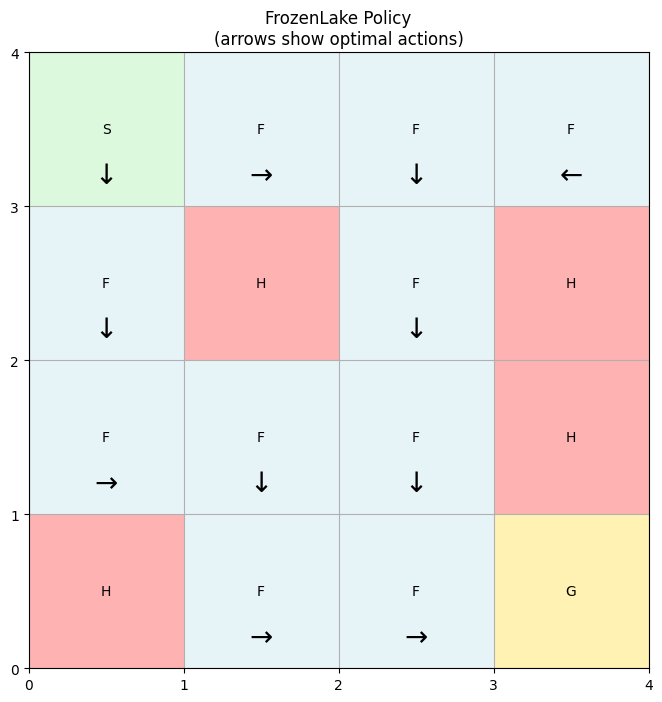
Finally, we can visualize the policy to check that it makes sense.
[32]:
def plot_policy(problem: FrozenLake, policy: Policy) -> None:
    """Visualize FrozenLake policy.

    Args:
        problem: FrozenLake problem instance
        policy: Policy array [n_states, 1] with action indices

    Returns:
        None
    """
    # Create figure
    fig, ax = plt.subplots(figsize=(8, 8))

    # Plot grid
    ax.grid(True)
    ax.set_xticks(range(problem.n_cols + 1))
    ax.set_yticks(range(problem.n_rows + 1))

    # Plot cell types
    cell_colors = {
        'S': 'lightgreen',
        'F': 'lightblue',
        'H': 'red',
        'G': 'gold'
    }

    for i in range(problem.n_rows):
        for j in range(problem.n_cols):
            cell = problem.map[i][j]
            ax.add_patch(plt.Rectangle(
                (j, problem.n_rows-1-i),
                1, 1,
                facecolor=cell_colors[cell],
                alpha=0.3
            ))
            ax.text(
                j+0.5, problem.n_rows-1-i+0.5,
                cell,
                ha='center', va='center'
            )

    # Plot policy arrows
    arrows = {0: '←', 1: '↓', 2: '→', 3: '↑'}

    for state_idx, action in enumerate(policy):
        state = problem.state_space[state_idx]
        row, col = state[0], state[1]

        # Skip arrows in terminal states
        if (problem.grid[row, col] == 1) | (problem.grid[row, col] == 2):
            continue

        ax.text(
            col+0.5, problem.n_rows-1-row+0.2,
            arrows[int(action[0])],
            ha='center', va='center',
            color='black',
            fontsize=20
        )

    ax.set_title('FrozenLake Policy\n(arrows show optimal actions)')
    plt.show()
[33]:
plot_policy(problem, solution.policy)
3.2 Slippery case
We can repeat the analysis for the slippery case, again comparing the results from MDPax and pymdptoolbox.
[34]:
problem = FrozenLake(map_name="4x4", is_slippery=True)
solver = ValueIteration(problem, gamma=0.9, epsilon=1e-3)
solution = solver.solve()
2025-01-05 22:05:59.966 | INFO     | mdpax.core.solver:__init__:159 - Solver initialized with frozen_lake_4x4_slippery problem
2025-01-05 22:05:59.992 | INFO     | mdpax.utils.checkpointing:_setup_checkpointing:123 - Checkpointing not enabled
2025-01-05 22:06:00.283 | INFO     | mdpax.solvers.value_iteration:solve:497 - Iteration 1 span: 0.33333
2025-01-05 22:06:00.420 | INFO     | mdpax.solvers.value_iteration:solve:497 - Iteration 2 span: 0.10000
2025-01-05 22:06:00.423 | INFO     | mdpax.solvers.value_iteration:solve:497 - Iteration 3 span: 0.06000
2025-01-05 22:06:00.427 | INFO     | mdpax.solvers.value_iteration:solve:497 - Iteration 4 span: 0.05400
2025-01-05 22:06:00.432 | INFO     | mdpax.solvers.value_iteration:solve:497 - Iteration 5 span: 0.03510
2025-01-05 22:06:00.436 | INFO     | mdpax.solvers.value_iteration:solve:497 - Iteration 6 span: 0.02916
2025-01-05 22:06:00.440 | INFO     | mdpax.solvers.value_iteration:solve:497 - Iteration 7 span: 0.02066
2025-01-05 22:06:00.443 | INFO     | mdpax.solvers.value_iteration:solve:497 - Iteration 8 span: 0.01669
2025-01-05 22:06:00.446 | INFO     | mdpax.solvers.value_iteration:solve:497 - Iteration 9 span: 0.01266
2025-01-05 22:06:00.451 | INFO     | mdpax.solvers.value_iteration:solve:497 - Iteration 10 span: 0.00999
2025-01-05 22:06:00.453 | INFO     | mdpax.solvers.value_iteration:solve:497 - Iteration 11 span: 0.00806
2025-01-05 22:06:00.457 | INFO     | mdpax.solvers.value_iteration:solve:497 - Iteration 12 span: 0.00647
2025-01-05 22:06:00.461 | INFO     | mdpax.solvers.value_iteration:solve:497 - Iteration 13 span: 0.00547
2025-01-05 22:06:00.465 | INFO     | mdpax.solvers.value_iteration:solve:497 - Iteration 14 span: 0.00469
2025-01-05 22:06:00.468 | INFO     | mdpax.solvers.value_iteration:solve:497 - Iteration 15 span: 0.00399
2025-01-05 22:06:00.472 | INFO     | mdpax.solvers.value_iteration:solve:497 - Iteration 16 span: 0.00342
2025-01-05 22:06:00.478 | INFO     | mdpax.solvers.value_iteration:solve:497 - Iteration 17 span: 0.00304
2025-01-05 22:06:00.482 | INFO     | mdpax.solvers.value_iteration:solve:497 - Iteration 18 span: 0.00271
2025-01-05 22:06:00.484 | INFO     | mdpax.solvers.value_iteration:solve:497 - Iteration 19 span: 0.00244
2025-01-05 22:06:00.489 | INFO     | mdpax.solvers.value_iteration:solve:497 - Iteration 20 span: 0.00218
2025-01-05 22:06:00.492 | INFO     | mdpax.solvers.value_iteration:solve:497 - Iteration 21 span: 0.00193
2025-01-05 22:06:00.497 | INFO     | mdpax.solvers.value_iteration:solve:497 - Iteration 22 span: 0.00171
2025-01-05 22:06:00.501 | INFO     | mdpax.solvers.value_iteration:solve:497 - Iteration 23 span: 0.00152
2025-01-05 22:06:00.505 | INFO     | mdpax.solvers.value_iteration:solve:497 - Iteration 24 span: 0.00134
2025-01-05 22:06:00.510 | INFO     | mdpax.solvers.value_iteration:solve:497 - Iteration 25 span: 0.00118
2025-01-05 22:06:00.514 | INFO     | mdpax.solvers.value_iteration:solve:497 - Iteration 26 span: 0.00104
2025-01-05 22:06:00.518 | INFO     | mdpax.solvers.value_iteration:solve:497 - Iteration 27 span: 0.00091
2025-01-05 22:06:00.523 | INFO     | mdpax.solvers.value_iteration:solve:497 - Iteration 28 span: 0.00080
2025-01-05 22:06:00.525 | INFO     | mdpax.solvers.value_iteration:solve:497 - Iteration 29 span: 0.00070
2025-01-05 22:06:00.531 | INFO     | mdpax.solvers.value_iteration:solve:497 - Iteration 30 span: 0.00061
2025-01-05 22:06:00.538 | INFO     | mdpax.solvers.value_iteration:solve:497 - Iteration 31 span: 0.00054
2025-01-05 22:06:00.543 | INFO     | mdpax.solvers.value_iteration:solve:497 - Iteration 32 span: 0.00047
2025-01-05 22:06:00.548 | INFO     | mdpax.solvers.value_iteration:solve:497 - Iteration 33 span: 0.00041
2025-01-05 22:06:00.550 | INFO     | mdpax.solvers.value_iteration:solve:497 - Iteration 34 span: 0.00036
2025-01-05 22:06:00.554 | INFO     | mdpax.solvers.value_iteration:solve:497 - Iteration 35 span: 0.00031
2025-01-05 22:06:00.557 | INFO     | mdpax.solvers.value_iteration:solve:497 - Iteration 36 span: 0.00027
2025-01-05 22:06:00.560 | INFO     | mdpax.solvers.value_iteration:solve:497 - Iteration 37 span: 0.00024
2025-01-05 22:06:00.564 | INFO     | mdpax.solvers.value_iteration:solve:497 - Iteration 38 span: 0.00021
2025-01-05 22:06:00.567 | INFO     | mdpax.solvers.value_iteration:solve:497 - Iteration 39 span: 0.00018
2025-01-05 22:06:00.571 | INFO     | mdpax.solvers.value_iteration:solve:497 - Iteration 40 span: 0.00016
2025-01-05 22:06:00.576 | INFO     | mdpax.solvers.value_iteration:solve:497 - Iteration 41 span: 0.00014
2025-01-05 22:06:00.578 | INFO     | mdpax.solvers.value_iteration:solve:497 - Iteration 42 span: 0.00012
2025-01-05 22:06:00.581 | INFO     | mdpax.solvers.value_iteration:solve:497 - Iteration 43 span: 0.00011
2025-01-05 22:06:00.582 | INFO     | mdpax.solvers.value_iteration:solve:502 - Convergence threshold reached at iteration 43
2025-01-05 22:06:00.584 | INFO     | mdpax.solvers.value_iteration:solve:521 - Extracting policy
2025-01-05 22:06:00.832 | INFO     | mdpax.solvers.value_iteration:solve:523 - Policy extracted
2025-01-05 22:06:00.833 | SUCCESS  | mdpax.solvers.value_iteration:solve:525 - Value iteration completed
[35]:
P, R = problem.build_transition_and_reward_matrices()
P, R = np.array(P), np.array(R)
vi = mdptoolbox.mdp.ValueIteration(P, R, discount=0.9, epsilon=1e-3)
vi.run()
print(f"MDPax and mdptoolbox policies match: {np.all(np.array(vi.policy) == solution.policy.flatten())}")
MDPax and mdptoolbox policies match: True
[36]:
plot_policy(problem, solution.policy)
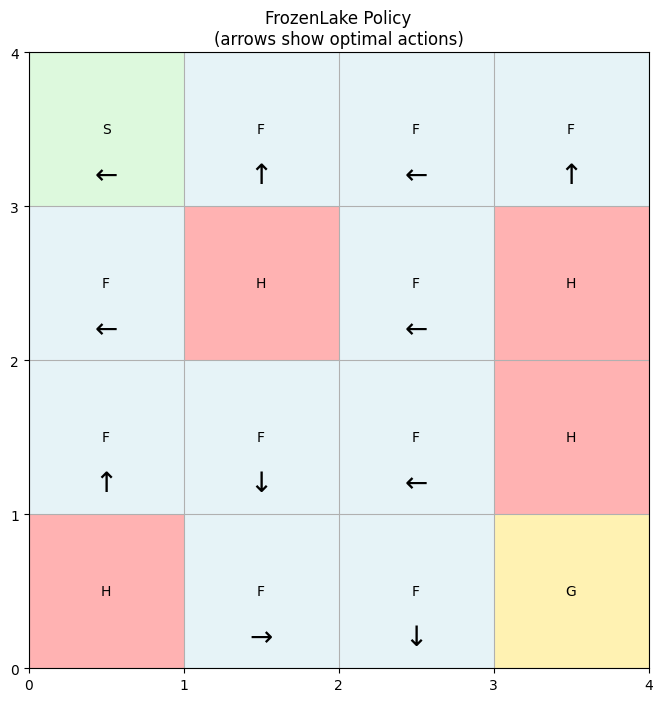
Note that even though this is the optimal policy, the agent won’t always follow the arrows exactly when is_slippery=True because there’s a chance of sliding left or right relative to the intended direction.
Checkpoints for problems defined in notebooks
The checkpointing demonstration in the Getting Started notebook uses an MDPax example problem, which is defined in a Python module and has a Hydra configuration. This allows the use of the restore method which can recreate the problem and solver using the config.
If a problem is defined in a notebook, as is the case here, a lightweight version of checkpointing is enabled instead. It still saves the solver state, and so optimization can be resumed, but the user must manually recreate the problem and solver before loading the checkpoint, as shown below.
[37]:
# Run the solver for 10 iterations
problem = FrozenLake(map_name="4x4", is_slippery=True)
solver = ValueIteration(problem, gamma=0.9, epsilon=1e-3,
                        checkpoint_dir="checkpoints/create_custom_problem/initial_checkpoints",
                        checkpoint_frequency=1)
solution = solver.solve(max_iterations = 10)
2025-01-05 22:06:01.534 | INFO     | mdpax.core.solver:__init__:159 - Solver initialized with frozen_lake_4x4_slippery problem
2025-01-05 22:06:01.565 | INFO     | mdpax.utils.checkpointing:_setup_checkpointing:147 - Lightweight checkpointing enabled - problem and solver must be reconstructed manually
2025-01-05 22:06:01.566 | INFO     | mdpax.utils.checkpointing:_setup_checkpointing:152 - Saving checkpoints every 1 iteration(s) to /home/joefarrington/other_learning/mdpax/examples/checkpoints/create_custom_problem/initial_checkpoints
2025-01-05 22:06:01.761 | INFO     | mdpax.solvers.value_iteration:solve:497 - Iteration 1 span: 0.33333
2025-01-05 22:06:01.904 | INFO     | mdpax.solvers.value_iteration:solve:497 - Iteration 2 span: 0.10000
2025-01-05 22:06:01.909 | INFO     | mdpax.solvers.value_iteration:solve:497 - Iteration 3 span: 0.06000
2025-01-05 22:06:01.916 | INFO     | mdpax.solvers.value_iteration:solve:497 - Iteration 4 span: 0.05400
2025-01-05 22:06:01.921 | INFO     | mdpax.solvers.value_iteration:solve:497 - Iteration 5 span: 0.03510
2025-01-05 22:06:01.929 | INFO     | mdpax.solvers.value_iteration:solve:497 - Iteration 6 span: 0.02916
2025-01-05 22:06:01.933 | INFO     | mdpax.solvers.value_iteration:solve:497 - Iteration 7 span: 0.02066
2025-01-05 22:06:01.937 | INFO     | mdpax.solvers.value_iteration:solve:497 - Iteration 8 span: 0.01669
2025-01-05 22:06:01.944 | INFO     | mdpax.solvers.value_iteration:solve:497 - Iteration 9 span: 0.01266
2025-01-05 22:06:01.948 | INFO     | mdpax.solvers.value_iteration:solve:497 - Iteration 10 span: 0.00999
2025-01-05 22:06:01.949 | INFO     | mdpax.solvers.value_iteration:solve:514 - Maximum iterations reached
2025-01-05 22:06:01.950 | INFO     | mdpax.solvers.value_iteration:solve:521 - Extracting policy
2025-01-05 22:06:02.140 | INFO     | mdpax.solvers.value_iteration:solve:523 - Policy extracted
2025-01-05 22:06:02.141 | SUCCESS  | mdpax.solvers.value_iteration:solve:525 - Value iteration completed
[38]:
# load in the checkpoint and resume
problem_restored = FrozenLake(map_name="4x4", is_slippery=True)
solver_restored = ValueIteration(problem_restored, gamma=0.9, epsilon=1e-3,
                                 checkpoint_dir="checkpoints/create_custom_problem/new_checkpoints",
                                 checkpoint_frequency=1)
solver_restored.load_checkpoint(checkpoint_dir="checkpoints/create_custom_problem/initial_checkpoints")
solution_restored = solver_restored.solve(max_iterations = 100)
2025-01-05 22:06:02.153 | INFO     | mdpax.core.solver:__init__:159 - Solver initialized with frozen_lake_4x4_slippery problem
2025-01-05 22:06:02.184 | INFO     | mdpax.utils.checkpointing:_setup_checkpointing:147 - Lightweight checkpointing enabled - problem and solver must be reconstructed manually
2025-01-05 22:06:02.185 | INFO     | mdpax.utils.checkpointing:_setup_checkpointing:152 - Saving checkpoints every 1 iteration(s) to /home/joefarrington/other_learning/mdpax/examples/checkpoints/create_custom_problem/new_checkpoints
2025-01-05 22:06:02.437 | INFO     | mdpax.solvers.value_iteration:solve:497 - Iteration 11 span: 0.00806
2025-01-05 22:06:02.460 | INFO     | mdpax.solvers.value_iteration:solve:497 - Iteration 12 span: 0.00647
2025-01-05 22:06:02.467 | INFO     | mdpax.solvers.value_iteration:solve:497 - Iteration 13 span: 0.00547
2025-01-05 22:06:02.473 | INFO     | mdpax.solvers.value_iteration:solve:497 - Iteration 14 span: 0.00469
2025-01-05 22:06:02.480 | INFO     | mdpax.solvers.value_iteration:solve:497 - Iteration 15 span: 0.00399
2025-01-05 22:06:02.485 | INFO     | mdpax.solvers.value_iteration:solve:497 - Iteration 16 span: 0.00342
2025-01-05 22:06:02.490 | INFO     | mdpax.solvers.value_iteration:solve:497 - Iteration 17 span: 0.00304
2025-01-05 22:06:02.497 | INFO     | mdpax.solvers.value_iteration:solve:497 - Iteration 18 span: 0.00271
2025-01-05 22:06:02.503 | INFO     | mdpax.solvers.value_iteration:solve:497 - Iteration 19 span: 0.00244
2025-01-05 22:06:02.511 | INFO     | mdpax.solvers.value_iteration:solve:497 - Iteration 20 span: 0.00218
2025-01-05 22:06:02.518 | INFO     | mdpax.solvers.value_iteration:solve:497 - Iteration 21 span: 0.00193
2025-01-05 22:06:02.525 | INFO     | mdpax.solvers.value_iteration:solve:497 - Iteration 22 span: 0.00171
2025-01-05 22:06:02.529 | INFO     | mdpax.solvers.value_iteration:solve:497 - Iteration 23 span: 0.00152
2025-01-05 22:06:02.536 | INFO     | mdpax.solvers.value_iteration:solve:497 - Iteration 24 span: 0.00134
2025-01-05 22:06:02.542 | INFO     | mdpax.solvers.value_iteration:solve:497 - Iteration 25 span: 0.00118
2025-01-05 22:06:02.549 | INFO     | mdpax.solvers.value_iteration:solve:497 - Iteration 26 span: 0.00104
2025-01-05 22:06:02.555 | INFO     | mdpax.solvers.value_iteration:solve:497 - Iteration 27 span: 0.00091
2025-01-05 22:06:02.561 | INFO     | mdpax.solvers.value_iteration:solve:497 - Iteration 28 span: 0.00080
2025-01-05 22:06:02.567 | INFO     | mdpax.solvers.value_iteration:solve:497 - Iteration 29 span: 0.00070
2025-01-05 22:06:02.574 | INFO     | mdpax.solvers.value_iteration:solve:497 - Iteration 30 span: 0.00061
2025-01-05 22:06:02.581 | INFO     | mdpax.solvers.value_iteration:solve:497 - Iteration 31 span: 0.00054
2025-01-05 22:06:02.590 | INFO     | mdpax.solvers.value_iteration:solve:497 - Iteration 32 span: 0.00047
2025-01-05 22:06:02.597 | INFO     | mdpax.solvers.value_iteration:solve:497 - Iteration 33 span: 0.00041
2025-01-05 22:06:02.603 | INFO     | mdpax.solvers.value_iteration:solve:497 - Iteration 34 span: 0.00036
2025-01-05 22:06:02.610 | INFO     | mdpax.solvers.value_iteration:solve:497 - Iteration 35 span: 0.00031
2025-01-05 22:06:02.616 | INFO     | mdpax.solvers.value_iteration:solve:497 - Iteration 36 span: 0.00027
2025-01-05 22:06:02.623 | INFO     | mdpax.solvers.value_iteration:solve:497 - Iteration 37 span: 0.00024
2025-01-05 22:06:02.631 | INFO     | mdpax.solvers.value_iteration:solve:497 - Iteration 38 span: 0.00021
2025-01-05 22:06:02.635 | INFO     | mdpax.solvers.value_iteration:solve:497 - Iteration 39 span: 0.00018
2025-01-05 22:06:02.641 | INFO     | mdpax.solvers.value_iteration:solve:497 - Iteration 40 span: 0.00016
2025-01-05 22:06:02.650 | INFO     | mdpax.solvers.value_iteration:solve:497 - Iteration 41 span: 0.00014
2025-01-05 22:06:02.657 | INFO     | mdpax.solvers.value_iteration:solve:497 - Iteration 42 span: 0.00012
2025-01-05 22:06:02.664 | INFO     | mdpax.solvers.value_iteration:solve:497 - Iteration 43 span: 0.00011
2025-01-05 22:06:02.666 | INFO     | mdpax.solvers.value_iteration:solve:502 - Convergence threshold reached at iteration 43
2025-01-05 22:06:02.668 | INFO     | mdpax.solvers.value_iteration:solve:521 - Extracting policy
2025-01-05 22:06:02.872 | INFO     | mdpax.solvers.value_iteration:solve:523 - Policy extracted
2025-01-05 22:06:02.872 | SUCCESS  | mdpax.solvers.value_iteration:solve:525 - Value iteration completed
[39]:
plot_policy(problem_restored, solution_restored.policy)
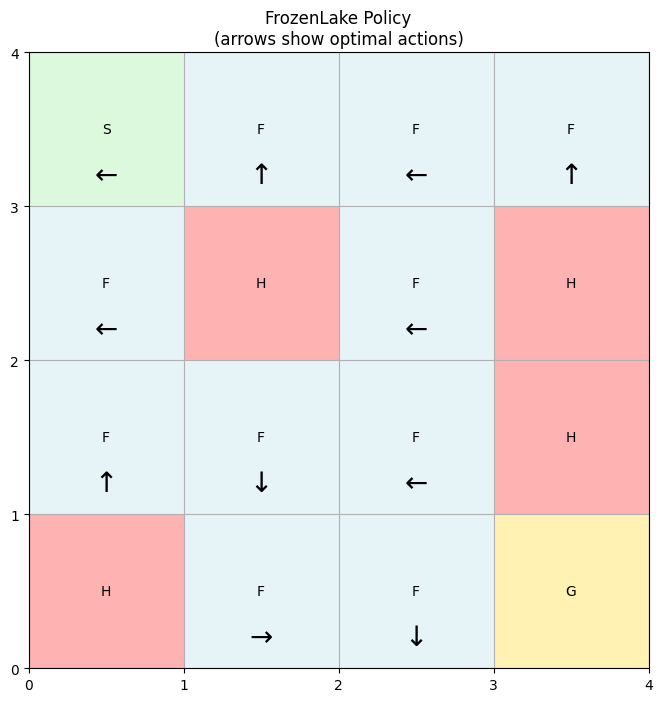
The plot shows the same policy as when we solved the same problem uninterrupted.
See the source code for the forest management problem for a simple example of a problem defined in a module with a Hydra configuration.
Next Steps
Try modifying the problem:
Create custom maps with different layouts
Modify the reward structure (e.g., small negative reward for each step)
Add new features like varying slipperiness or wind effects
For more examples and documentation: